For five thousand years, documents have carried trust between people: who owes whom, which rules apply, what both sides agreed. Agents now draft and check those documents. A person still signs them and answers for them. CoPage is where both of those happen.
I'm a technology consultant at a Big Four firm, and nearly all my client work ends up as a document: a proposal, an architecture, a business case. Over the past year agents took on more and more of the writing. The documents and the tools around them stayed the same. CoPage started on 27 September 2026 to close that gap, and it is now my main product.
Five thousand years of documents
Every leap in trade came with a new kind of document. A clay tablet let a temple track debts. Double-entry account books let strangers trade on written records. The PDF made a contract look the same on every screen.
c. 3200 BCE
Clay tablets
Writing starts as bookkeeping: who owes whom, and how much.
c. 1754 BCE
Hammurabi’s code
Rules carved in stone, the same for everyone to read.
1215
Magna Carta
A sealed document binds even the king.
1494
Account books
Pacioli’s method lets strangers trade on written records.
1993
PDF
The same document on every screen, sent anywhere in seconds.
Now
Agents
They draft and check documents. People still sign and answer for them.
Agents are the next step. They change who drafts the document and who checks it. The person who signs it, and carries the risk and the benefit, stays the same.
Agents prepare. People sign.
Inside an organization the work now splits three ways. One person is accountable: they sign the deal and answer for it. A few people are responsible: they do the work with agents and check it. The agents prepare and check, many at once. Between organizations the old rule holds. People hand documents to people, and each side's agents stay inside their own walls.
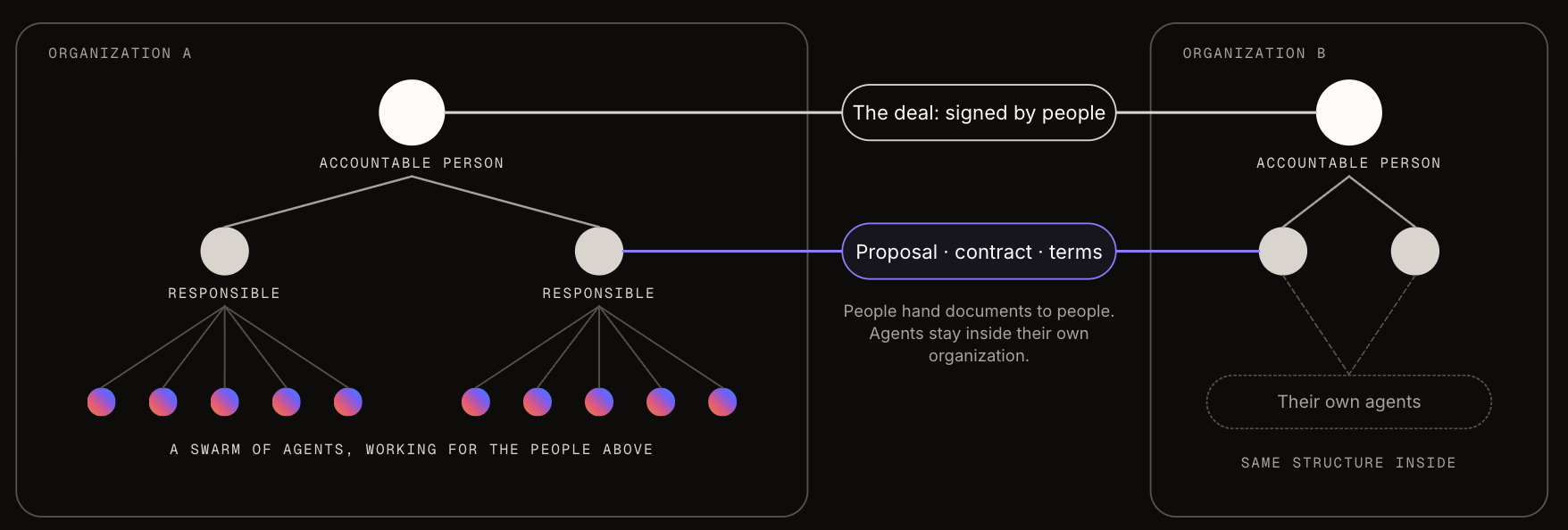
In that picture, work moves through documents. The proposal, the architecture and the handover are where agents and people meet, so that's where the tooling has to get good.
What a document needs when agents write it
Today's tools fail from both ends. Ask a coding agent for a deck and you get a PNG, a Mermaid block or an HTML page, none of which you would send a client. Ask twice and the same brief gives you two different decks. Change the file by hand and the agent loses track of what's in it, so the next edit drifts.
A document in the agentic era needs four things:
- Structure an agent can edit. Real slides and diagram objects, versioned, with every change showing the person or agent behind it.
- The organization's standards, built in. Themes, templates, checks and skills, so the tenth proposal follows the same rules as the first.
- A person who signs off. Checks run before anything leaves the building, and people have the last word.
- The formats people already send. Native PowerPoint, PDF, SVG and draw.io. CoPage sits in front of PowerPoint, and the client still gets a .pptx.
What CoPage is today
CoPage starts with the two kinds of document consultants and architects produce most: decks and diagrams. It comes in two parts.
- The CoPage app (early access) holds a team's decks and diagrams. Your agent connects over MCP, sees the slide you have open, edits it while you watch and answers the comments you leave. Every change has an author and an undo button.
- The CoPage CLI is free and runs on your machine with no account. Your coding agent draws architecture diagrams from the repo, renders them, fixes what's wrong and saves an SVG that opens for editing again.
It works with the agent you already use: Claude Code, Codex, Cursor or GitHub Copilot, through the CLI or MCP. Diagrams use the official AWS, Azure and Google Cloud icons, over 3,000 in all. Documents, specs and handovers come after decks and diagrams.
One run: from a call transcript to a proposal
The client in this sample is Halden Mobile, a fictional telco that wants an AI agent to handle billing disputes. The prompt is one sentence plus the call transcript:
Draft the dispute process in BPMN, the target architecture on Azure and the run cost for Halden. Put it in a CoPage deck.
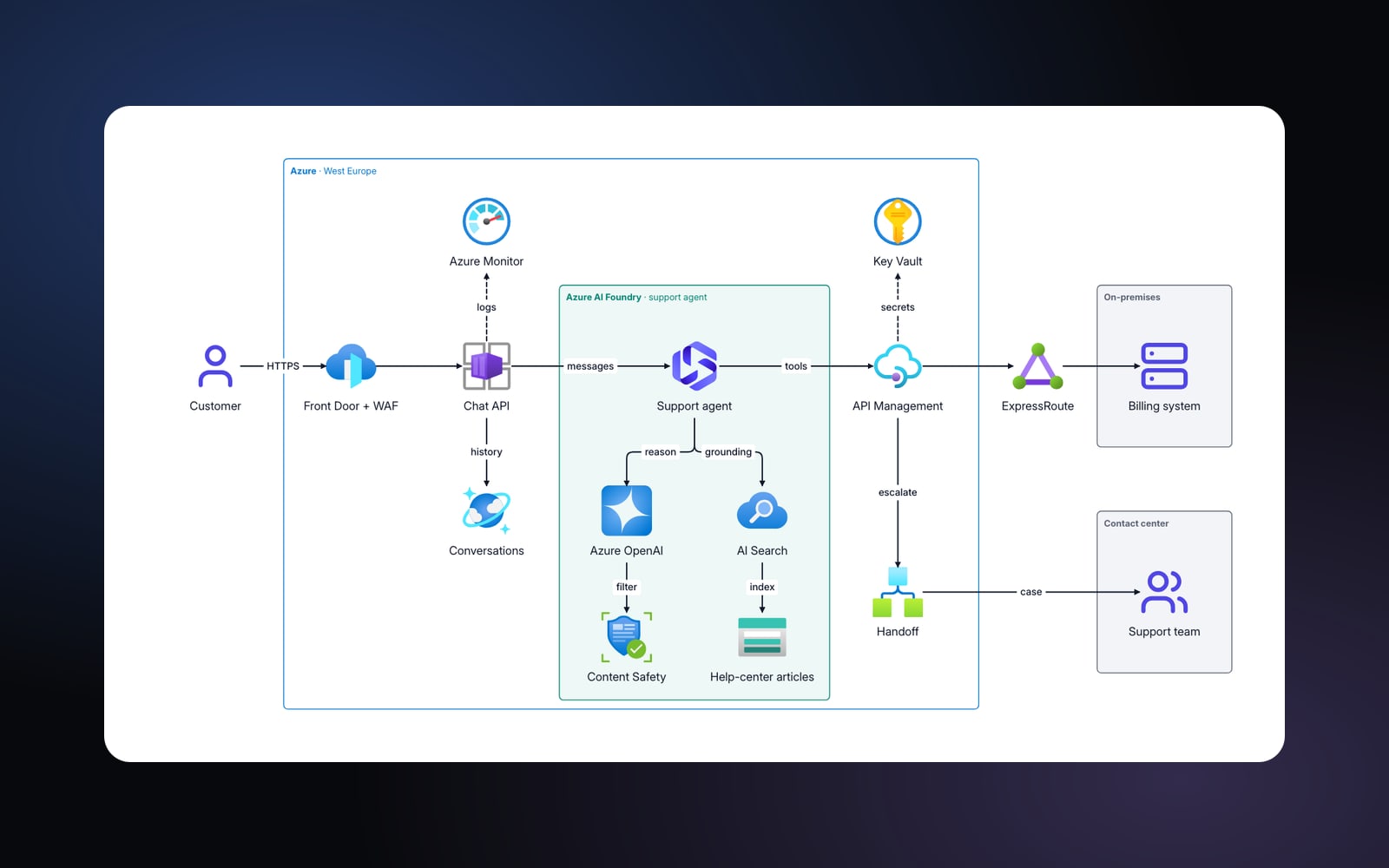
The agent builds three slides. The process comes first, with lanes for the customer, the AI agent, the billing system and the support team. The architecture at the top of this page comes second. The run cost closes the deck.
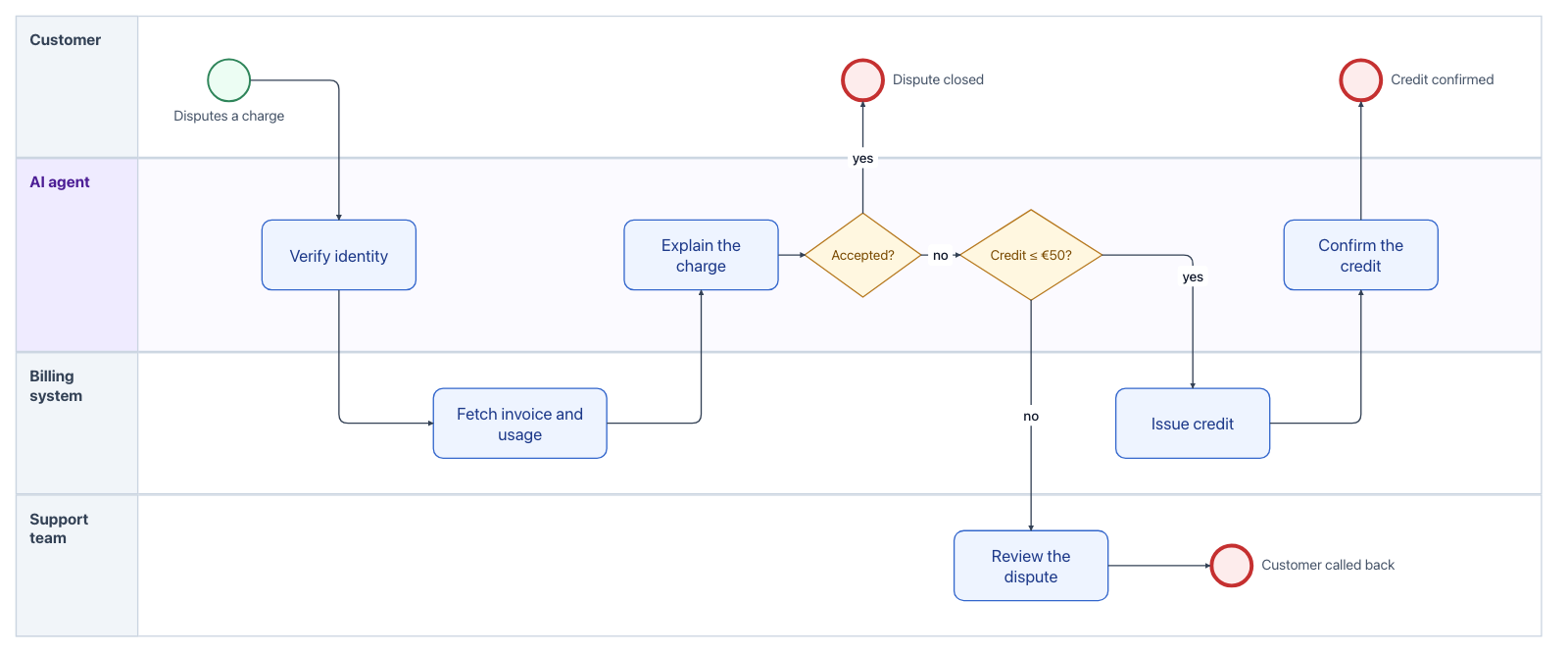
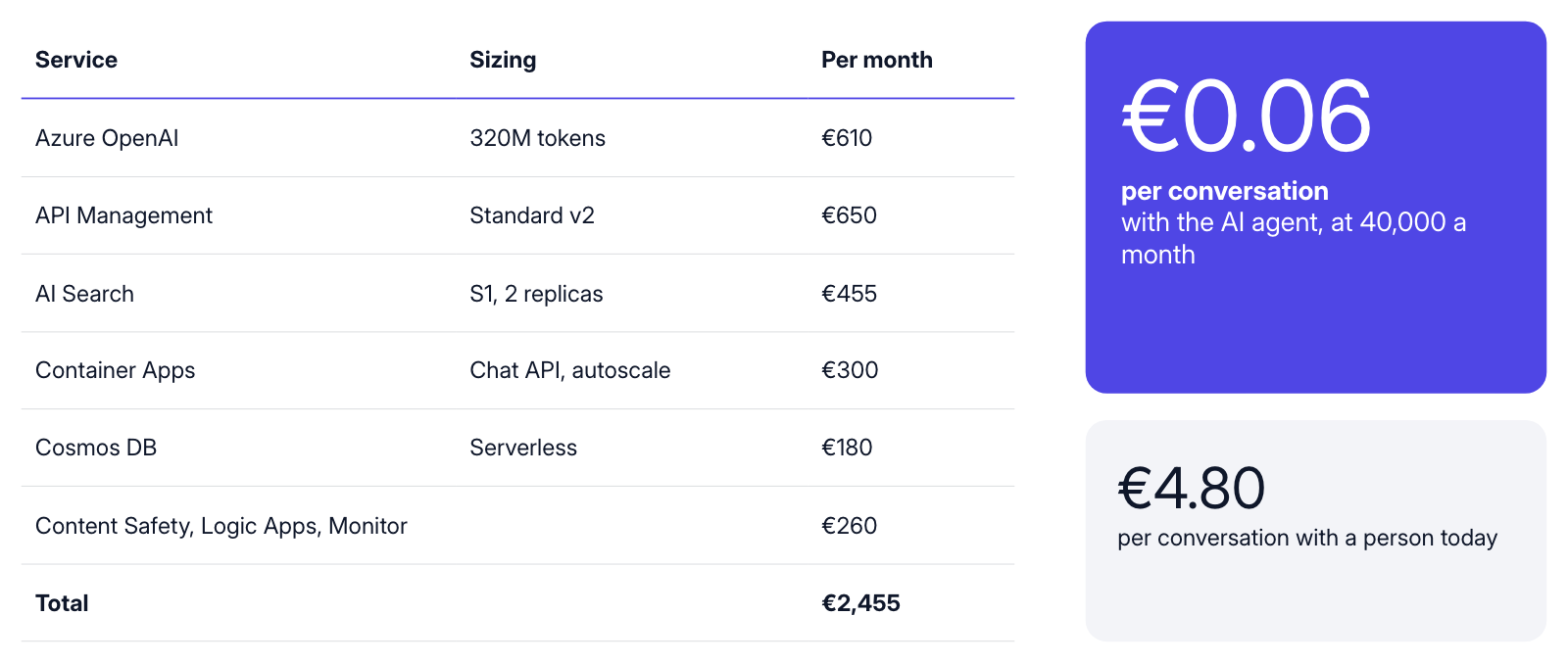
The first version listed AI Search at $490, in a deck priced in euros. A tired reviewer misses that. The Client-ready pack of checks flagged “Slide 4 uses USD while most of the deck uses EUR”, the agent fixed it to €455, and the deck went to zero findings. Then a person read it and decided it could go out.
Checks are the organization's standards
A check is a rule a deck or diagram has to pass before anyone presents it. Some come built in: leftover placeholder text, personal data such as emails and IBANs, one currency throughout, connectors attached in diagrams. A firm adds its own as text rules (“Confidential on every slide”) or as AI rules, questions answered per slide, such as how formal a slide reads.
Agents run the same checks people do, and on the CLI they also look at the render. An agent drew this checkout architecture from a small Terraform repo, and its first round had problems:
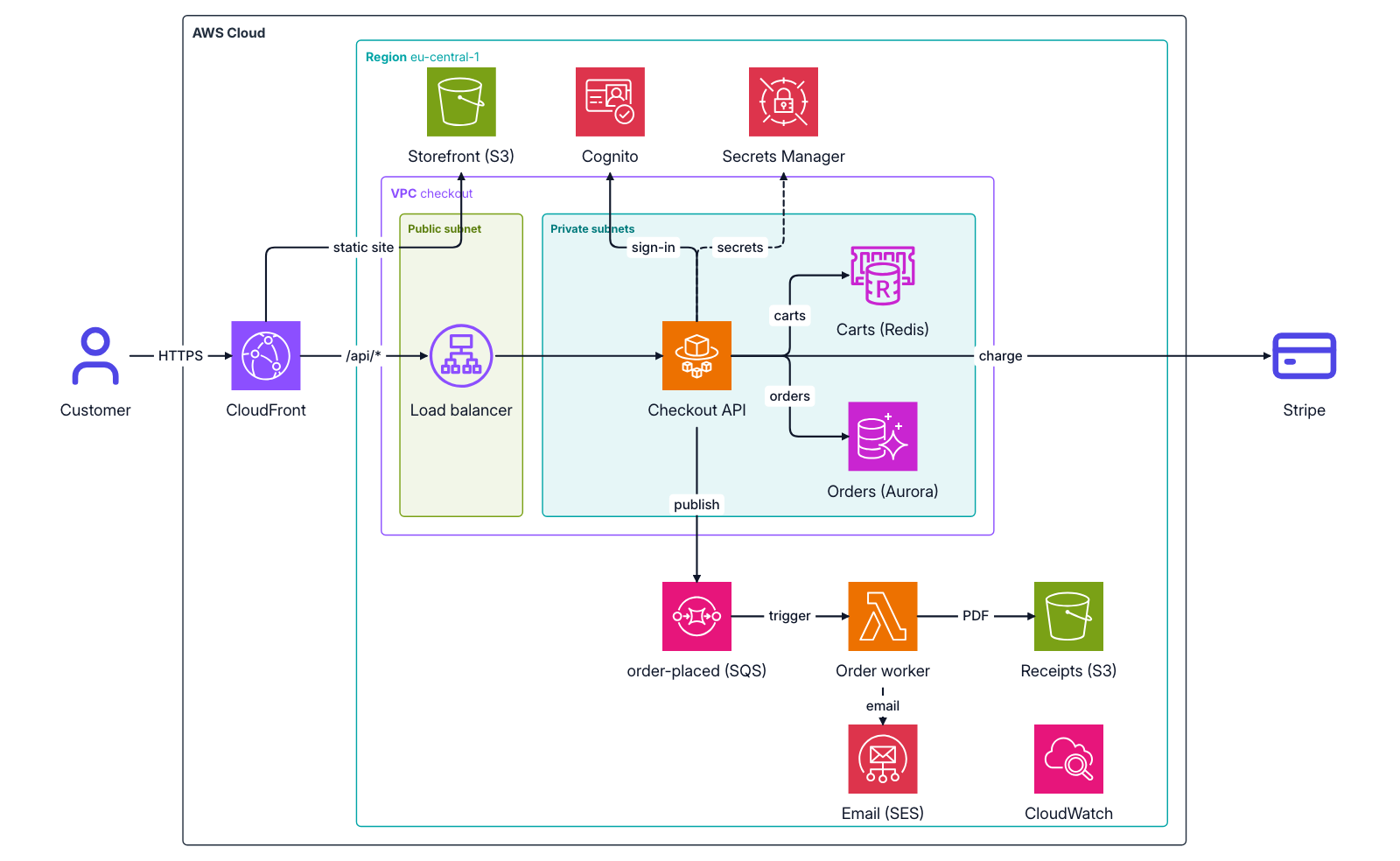
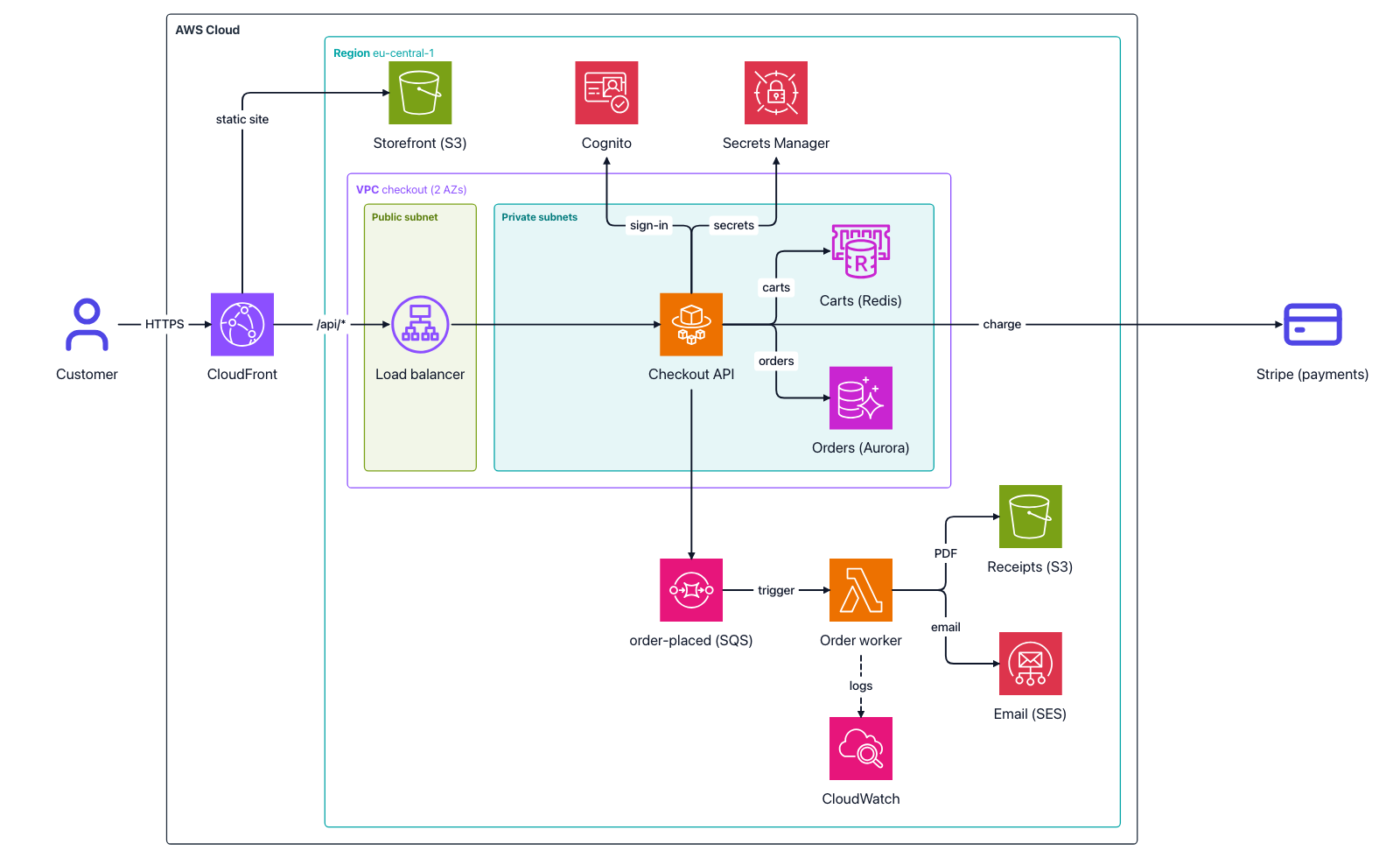
If that kind of feedback comes as automatic checks, it's easier to teach people to stick to a style guide.
What consultants and architects say
Consultants, architects and managers in large organizations who tried CoPage reacted in three consistent ways.
Diagrams pull people in. “The diagrams are 11 out of 10,” said one senior consultant. An enterprise architect asked for a process “fully BPMN”, got it in a few minutes, and put the value in one sentence:
You wouldn't have to draw it by hand or generate some PNG. You have an editable version you can fix and put somewhere later.
Consistency hurts more than speed. People who build offers in general AI tools say the same brief gives a different deck each time. A firm can't put its name on that, so in CoPage the standards live in the workspace, where every agent and every person runs into them.
Permission decides the rest. Large firms need tools approved and want documents on their own infrastructure, and many consultants have no coding agent on their laptop. So private deployment and connectors for chat assistants such as claude.ai and ChatGPT are next on the list.
Why it's my main product now
My consulting work is helping companies adopt AI agents. The advice keeps landing in the same place: let agents do the work, and let your standards and your people decide what reaches the client. CoPage turns that advice into a tool, and the consultants and architects who tried it want it for their own work. That's why it is my main product.
Try it
If you have a coding agent, start with the free CLI. It installs in one line on macOS and Linux:
curl -fsSL https://copage.app/install.sh | sh- Run
copage initandcopage skill installin your repo. - Ask your agent: “Draw our checkout on AWS and put it in docs/architecture.svg.”
- Run
copage opento edit the result by hand.
If your team builds client decks and proposals, request early access to the app. The app stores documents in the EU (Frankfurt) and never uses them to train AI models.